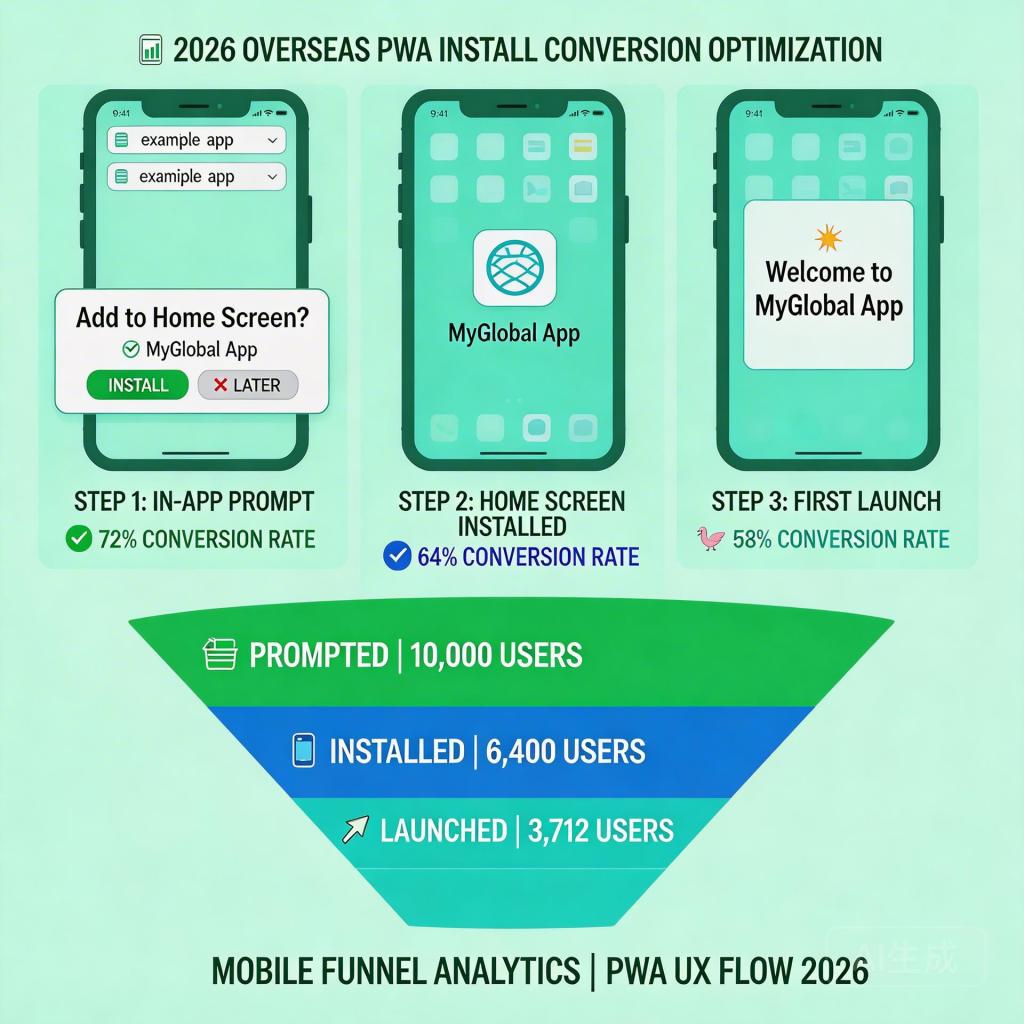
For overseas app teams distributing through PWA, the install page is the single highest-leverage optimization point in the entire acquisition funnel. Unlike a Google Play listing — where layout, visuals, and UX are controlled by Google — a PWA landing page gives you full control over how users experience the install prompt. This guide covers how to optimize PWA landing page install conversion rates for overseas apps in 2026.
→ Want to bypass Google Play entirely? See how ROiBest PWA works — no submission, no cut, 1.2x installs.
Why PWA Landing Page Install Rate Is the Most Controllable UA Metric
Most user acquisition teams optimize the metrics they can control most directly: ad targeting, creative, bid strategy, and budget allocation. PWA install rate sits downstream of all these — and it’s actually more controllable than any of them, because it’s entirely owned by your team.
The business impact is direct: on a campaign spending $10,000/month at a $10 CPI to drive 1,000 installs, a 20% improvement in install rate produces 200 additional installs at zero additional cost — equivalent to $2,000 in saved ad spend, or a 20% reduction in effective CPI.
Common install rate ranges for PWA landing pages in 2026:
- Unoptimized PWA install page: 5–10% (no pre-prompt UI, immediate browser prompt, no value explanation)
- Partially optimized: 10–15% (clear headline, basic prompt timing, mobile-responsive layout)
- Fully optimized (ROiBest-powered): 15–22%+ (custom pre-prompt UX, retimed prompt, push notification setup, retry logic)
Five Optimization Levers for PWA Landing Page Install Conversion
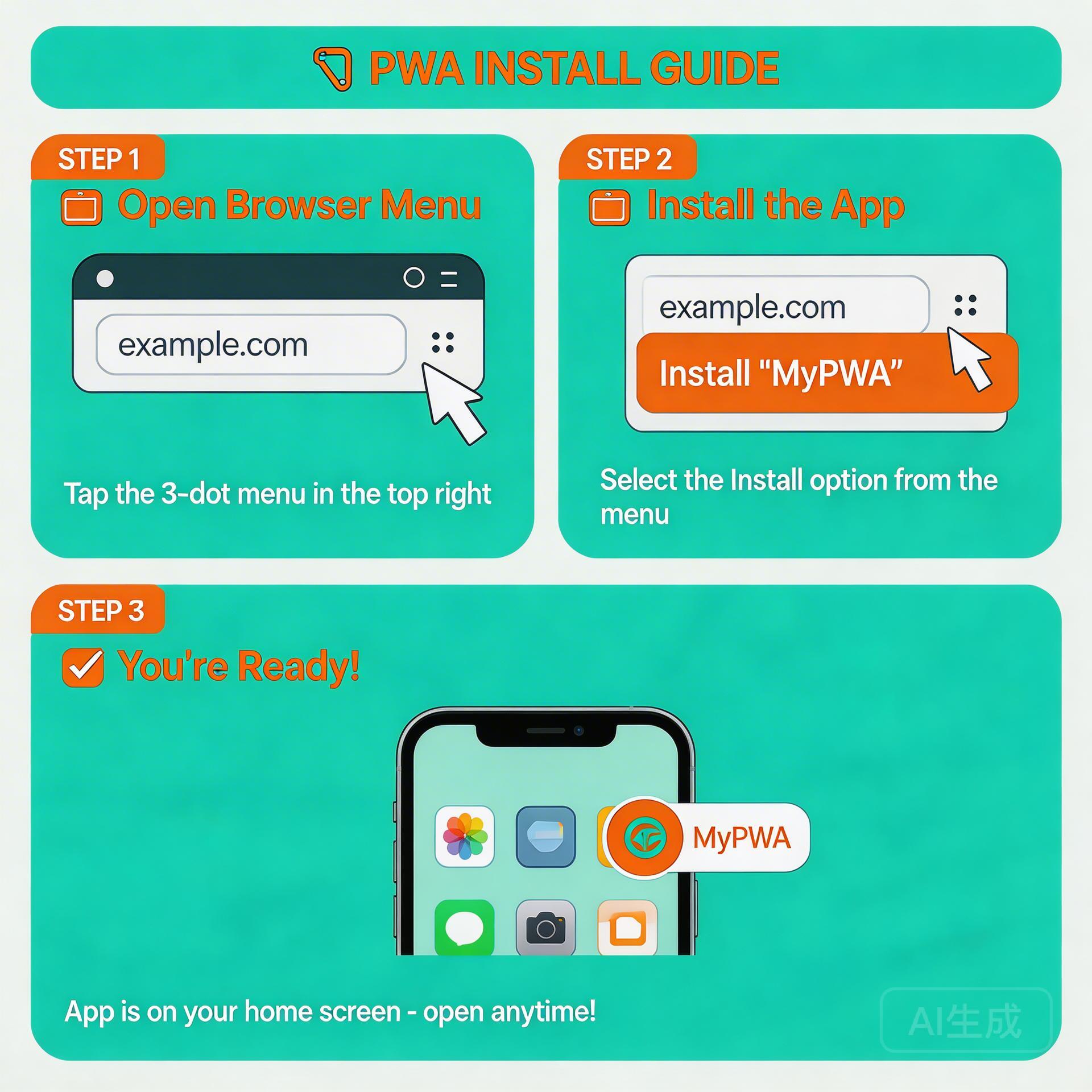
Lever 1: Above-the-Fold Message That Matches the Traffic Source
The install rate decline begins when the user’s expectation from the ad or search result doesn’t match what they see on the landing page. Message match between traffic source and landing page is the single biggest predictor of whether a user will scroll, engage, and eventually install.
For each major traffic source, the above-the-fold section should communicate:
- Paid social (Meta/TikTok): The specific hook from the ad creative — if the ad showed a game feature, the headline should reference that feature
- Google UAC/PMAX: The use case or benefit the audience signal suggests — e.g., “fast install, play now” for in-market gaming audiences
- SEO / organic: The intent of the search query — comparison queries need a feature/benefit comparison above the fold, not just a download button
Lever 2: Pre-Prompt UI That Explains What “Add to Home Screen” Means
The browser’s native install prompt asks the user to “Add [App Name] to Home Screen” — a phrase most non-technical mobile users don’t instinctively understand as equivalent to “install the app.” Without context, 40–60% of users dismiss the prompt reflexively.
A custom pre-prompt screen that shows:
- A visual of what the app icon looks like on their home screen
- Two lines explaining: “This adds the app to your phone — no app store needed, instant access”
- A “Install Now” button that then triggers the actual browser prompt
This pre-prompt approach consistently increases install prompt acceptance by 30–50% in A/B tests across app categories including games, social apps, and utility tools.
Lever 3: Prompt Timing Based on Engagement, Not Page Load
Triggering the install prompt immediately on page load is the most common PWA landing page mistake. Users who haven’t yet engaged with any content have no reason to commit to an install — and dismissing the prompt makes it harder to re-trigger.
The optimal prompt timing sequence:
- User lands → above-the-fold content loads → no prompt shown
- User scrolls past 50% of the page OR interacts with a video/screenshot carousel → pre-prompt screen appears
- User clicks “Install Now” in pre-prompt → browser’s native A2HS prompt fires
- If browser prompt dismissed → defer retry for 48 hours, then show softer re-prompt on return visit
Lever 4: Mobile Page Load Speed Below 2 Seconds
PWA landing pages frequently underperform on mobile load speed — particularly when they include large hero images, uncompressed videos, or third-party scripts that block rendering. Every 100ms of additional load time reduces install rate by approximately 1.5–2% in mobile-heavy traffic markets (Southeast Asia, Latin America, MENA — the key target markets for overseas app teams).
Core speed optimizations:
- Serve hero images in WebP format, compressed to under 150KB
- Defer all non-critical JavaScript (analytics, chat widgets, third-party pixels) until after page interactive
- Use a CDN with edge nodes in target markets — load time differences of 300–800ms are common between origin-only and CDN-served pages
Lever 5: Post-Install First-Session Experience
Install rate is the conversion metric — but it’s the first session experience that determines whether the install produces long-term value. PWA landing pages can be designed to guide users directly into their first app session with minimal friction:
- After A2HS install, redirect to the game/app’s welcome screen automatically (don’t show a blank PWA splash screen)
- For games: pre-fill the new user tutorial start so the first session begins in under 5 seconds
- Request push notification permission during first session (after the user has seen value) — not at install time
For the complete distribution strategy including how PWA compares to Google Play on install rate, revenue share, and push notification capabilities, see our Google Play alternative guide for Android app distribution — the definitive resource for overseas teams choosing their Android distribution stack.
If you’re optimizing the add-to-home-screen setup process itself, the Android PWA add to home screen guide for 2026 covers the full configuration and UX setup in detail.
Install Rate Optimization Checklist for PWA Landing Pages
- Audit above-the-fold message match for each traffic source (paid social, UAC/PMAX, organic)
- Implement custom pre-prompt UI that visually explains the add-to-home-screen action
- Set prompt timing to trigger after scroll engagement (50%+) or video interaction
- Measure page load speed on target market mobile networks — target under 2 seconds
- Test retry prompt logic: show a softer prompt on users’ second visit if they dismissed the first
- Configure post-install redirect to app first session, not a static confirmation page
Skip the app store. Go live instantly, keep 100% of your revenue.
ROiBest helps Android app teams launch PWAs — no review process, no 30% Google Play cut, and push notifications that work even after uninstall. Teams see up to 1.2x higher install conversion rates vs native app downloads.
 WebApp中文站
留下评论