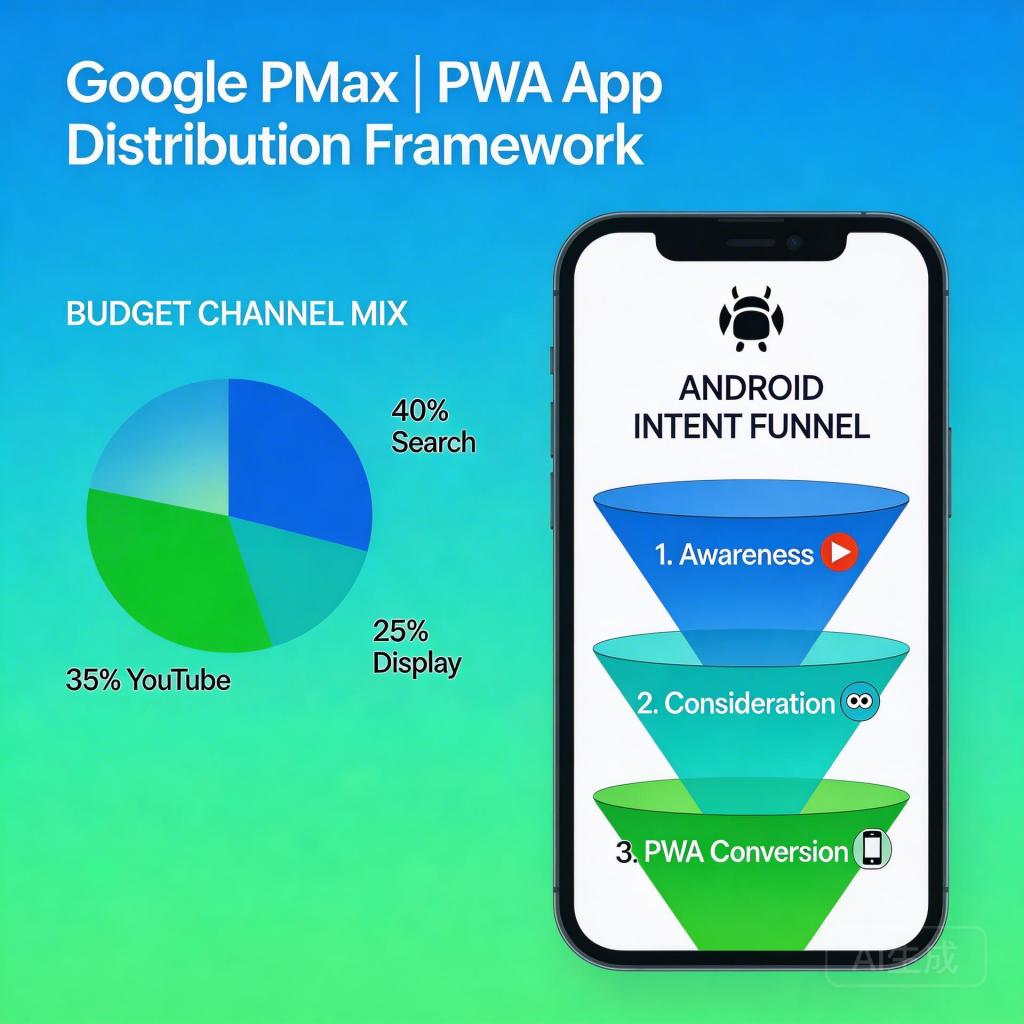
For teams deciding whether to invest in Android PWA distribution, one of the most practical questions is: “How do we actually run Google Ads to this?” In 2026, the answer involves understanding not just how to set up a PMax campaign for PWA installs — but how to allocate budget across channels in a way that maximizes install efficiency for an app that doesn’t live in the Google Play Store.
→ Want to bypass Google Play entirely? See how ROiBest PWA works — no submission, no cut, 1.2x installs.
Why Budget Allocation Matters More for PWA Than for Play Store Campaigns
When you run Google Ads to a Google Play listing, the store itself does some of the conversion work — trusted brand, star ratings, download counts. Users arriving from Google Ads land on a page they recognize and trust.
When you run Google Ads to a PWA install landing page, the landing page does all the conversion work. There’s no Google Play store badge, no existing review infrastructure, no “100M downloads” social proof. Everything that makes a user decide to install happens on your page — and that means budget channel allocation affects PWA campaigns differently:
- High-intent Search traffic (users who searched for your game or app category) converts readily on a well-optimized PWA page — the intent does the heavy lifting
- Display and Discovery traffic (users encountering your app while doing something else) requires much more persuasion work from the landing page — and needs a different page design entirely
- Misallocating budget toward channels that don’t convert well for PWA (before the landing page is optimized for them) wastes acquisition spend and corrupts the algorithm’s learning
The Right PMax Budget Allocation Framework for PWA Distribution
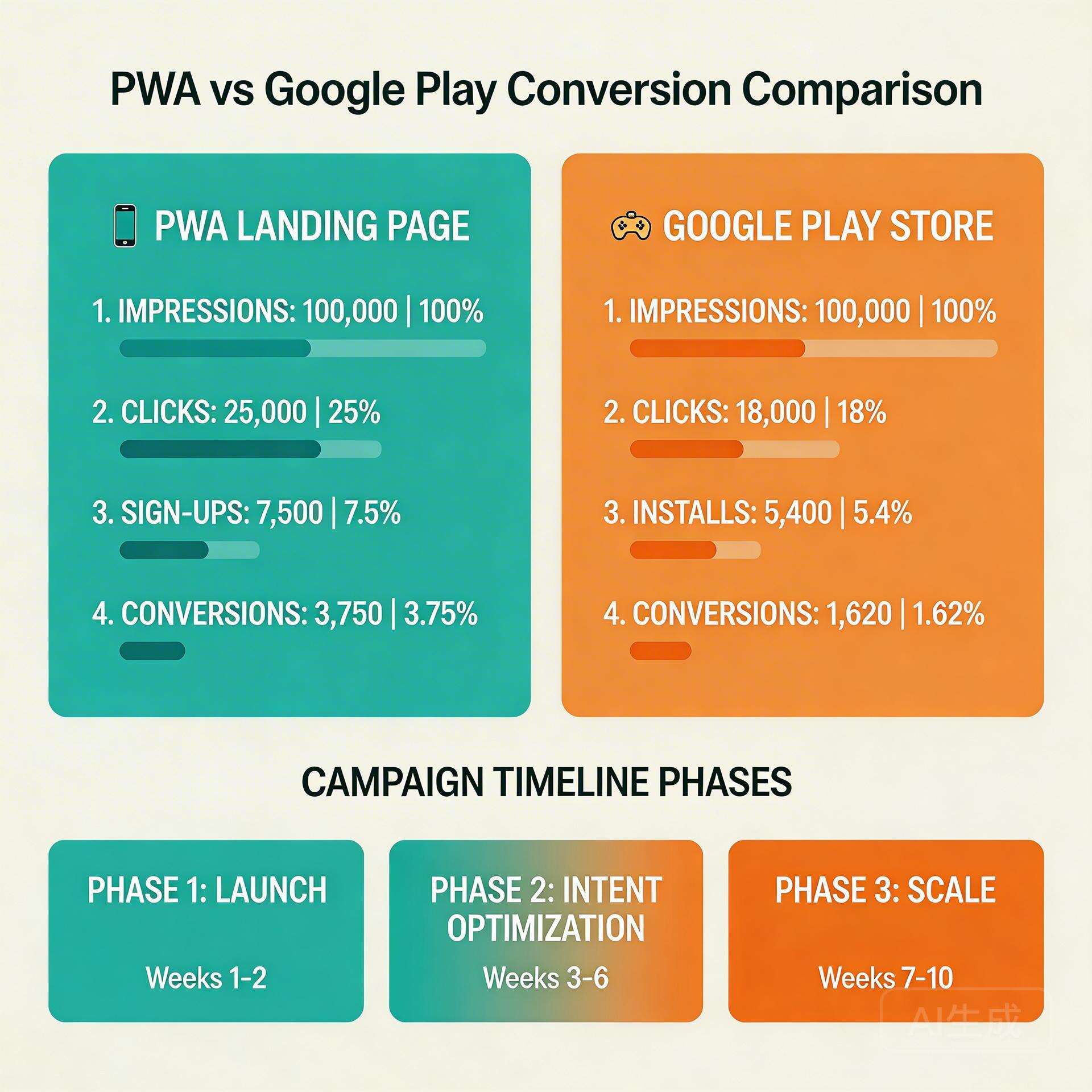
Google PMax doesn’t let you set explicit channel spend percentages — but you can significantly influence how the algorithm allocates budget through your campaign configuration choices:
1. Add Strong Keyword-Based Audience Signals
Upload customer match lists (your existing users or purchasers) and custom intent audiences built from keywords related to your app category. When your audience signals are strong and specific to high-intent users, PMax naturally allocates more budget to Search and YouTube inventory — where users with high match to your signals appear most frequently — rather than broad Display placements.
2. Organize Asset Groups by Intent Stage
Create separate asset groups for different traffic intent levels:
- High-intent group: Text/responsive search assets, keyword-specific headlines, decision-stage landing page
- Video group: Short demo video (15–30 seconds), YouTube-specific headlines, consideration-stage landing page
- Display group: Image assets, brand awareness messaging, awareness-stage landing page with email capture
This structure doesn’t prevent PMax from allocating across channels — but it gives the algorithm distinct creative signals for each channel type, improving conversion quality in each.
3. Use Secondary Conversion Events to Guide Budget Quality
Import post-install events from GA4 as secondary conversion actions: first session completion, first game round, first deposit or subscription. These quality signals help PMax understand that “install quality” varies — that a user who installs and immediately starts playing is more valuable than one who installs and never opens the app. Over time, this shifts budget toward the channels that drive better-quality installs. Why PMax traffic converts better to PWA than Play Store →
Channel Allocation Benchmarks for PWA Distribution Campaigns
For teams using Google PMax to drive PWA installs, here are 2026 benchmarks for a well-configured campaign after the learning phase (30+ days running):
- Search channel: 40–55% of install events. If below 35%, audience signals need strengthening.
- YouTube channel: 20–30% of install events. Best for awareness-stage campaigns; requires message continuity from video to landing page.
- Display channel: 15–25% of install events. Lower CVR per impression, but lowest CPM — can contribute volume at scale if LTV of Display-acquired users is positive.
- Discover/Gmail: 5–10% combined. Awareness utility; not primary install driver.
If your channel mix deviates significantly from these benchmarks — especially if Display is above 35% of installs — check your conversion signal quality. The algorithm is likely over-allocating to Display because it can’t distinguish intent quality across channels from weak conversion data.
How PWA Landing Page Design Affects Channel Allocation
There’s a feedback loop between your landing page performance and PMax’s channel allocation that many advertisers don’t realize:
When your landing page converts well for Search traffic (high CVR, fast load, clear message), the algorithm learns that Search-intent users convert for your app. This encourages more Search allocation. When your landing page is slow or poorly matched to Search intent, CVR suffers, and the algorithm distributes budget away from Search toward channels where it sees more conversions (even if they’re lower-quality conversions from Display view-throughs).
The optimization sequence for PWA distribution campaigns should always be:
- Optimize landing page for Search/high-intent traffic first (fastest wins, highest quality)
- Create YouTube variant with message continuity from your video creative
- Build Display variant for awareness/email capture (only after Search and YouTube are optimized)
PWA landing page install conversion rate guide →
Budget Decision: How Much to Spend to Find What Works for PWA
A common question from teams new to PWA distribution via Google Ads: how much initial budget is needed to get statistically meaningful data?
Rule of thumb for PMax PWA campaigns: budget for at least 50 installs per week to get out of the learning phase. At typical 2026 CPI benchmarks ($0.50–$2.00 for games, $1.50–$4.00 for AI apps), this means a weekly budget of $25–$200 for games and $75–$200 for AI apps — depending on your market and category.
During the learning phase (days 1–14), expect CPIs to be 30–50% higher than your eventual stable performance. This is normal — the algorithm is exploring. Cutting campaigns short because learning phase CPIs look high is the most common mistake in new PWA acquisition campaigns.
After the learning phase, a well-optimized PWA campaign should be at or below your target CPI with the channel allocation settling into the benchmarks described above. If you’re still above target after day 21, the issue is almost always a landing page problem — not the campaign structure or budget level.
For the complete framework on Android PWA vs. Google Play distribution decisions, see our Google Play alternative complete distribution guide.
5 Steps to Optimize Your PMax Budget Allocation for PWA Distribution
- Upload your best customer match list (existing high-LTV users) as an audience signal — this is the single most impactful action for improving Search allocation in new campaigns
- Create three asset groups organized by intent stage (Search/high-intent, YouTube/video, Display/awareness) with channel-appropriate landing pages
- Import GA4 post-install events as secondary conversion actions — first session, tutorial, purchase — to teach the algorithm that install quality varies
- Review channel allocation at day 21 and day 45; if Search is below 35% of installs, refresh your audience signals with a newer customer list
- Never make campaign changes during days 1–14 (learning phase) — CPI volatility in this window is expected and stabilizes naturally
Realistic Timeline: What to Expect From a New PMax PWA Campaign
Teams launching their first Google Ads → PWA distribution campaign often have unrealistic expectations about the timeline to efficient performance. Here’s a realistic week-by-week expectation:
Week 1–2 (Learning Phase): CPI is 30–50% above eventual stable performance. Channel allocation is exploratory — you’ll see spending across all channels simultaneously. Install volume is lower than eventual scale. Do not make changes.
Week 3–4 (Early Optimization): CPI begins stabilizing. Algorithm starts concentrating spend on higher-converting channels. This is when you make your first landing page review — check GA4 CVR by traffic source, identify the lowest-performing segment, make a targeted landing page improvement (one change at a time).
Month 2 (Optimization Phase): Channel mix has mostly settled. CPI is approaching benchmark. Post-install retention data is becoming available — import it as secondary conversions. Refresh your audience signal list with any new purchasers or high-LTV users who’ve joined since campaign launch.
Month 3+ (Scaling Phase): Campaign is ready for budget scaling (max 20% per week). Creative refreshes prevent audience fatigue. Quarterly full audits maintain performance. Campaigns that reach month 3 with consistent management consistently deliver 20–35% lower blended CPI than their first-month performance.
Comparing PWA PMax Distribution With Meta Ads for the Same App
Many teams running PWA distribution use both Google PMax and Meta Ads. Understanding how budget allocation differs between these two channels helps avoid the common mistake of applying PMax thinking to Meta (or vice versa):
- PMax strength: High-intent Search capture (users actively looking for your game/app category), measurable install intent from keyword signals, strong attribution via GA4
- Meta Ads strength: Audience-driven discovery (reaching users who match your ideal profile but aren’t actively searching), creative-led engagement, strong for AI apps and gaming where the creative itself drives the install decision
- Budget split guidance: For new app launches, favor PMax 60/40 over Meta while building search volume; for established apps with strong brand search, increase Meta to capture warm audiences; for AI apps with high creative dependency, consider 50/50 or Meta-heavy splits
Both channels send traffic to the same PWA landing page — making the landing page optimization exercise doubly important. A landing page improvement that lifts PMax Search CVR typically also lifts Meta click-through CVR, since both benefit from faster load speed and clearer message match.
Skip the app store. Go live instantly, keep 100% of your revenue.
ROiBest helps Android app teams launch PWAs — no review process, no 30% Google Play cut, and push notifications that work even after uninstall. Teams see up to 1.2x higher install conversion rates vs native app downloads.
 WebApp中文站
留下评论